Available in:
Biologics LIMS
The Biologics LIMS Registry includes a
Compound registry source type to represent small molecules. Compounds can be registered with or without a SMILES string, and can be used as components when building molecules — making it easier to model antibody drug conjugates, enzymes, and similar constructs.
When a user is viewing a Compound in the Bioregistry, they can access 2D chemical structure images and basic calculations like molecular weight. A field of the custom type "SMILES" takes string input and returns an associated 2D image file and calculations to be stored as part of the compound and displayed in registry grids.
Identified and Unidentified Compounds
Compounds can be registered with or without a SMILES string, and uniqueness is enforced accordingly:
- Identified — a SMILES string is provided. The system enforces uniqueness based on the chemical structure, so duplicate structures cannot be registered.
- Unidentified — no SMILES string is provided. The system enforces uniqueness based on the compound name.
This distinction lets teams register compounds they are working with even before full structural data is available.
SMILES Field
The
Compound registry source type uses a custom
SMILES field type only available in the Biologics module for this specific registry source. This datatype enables users to provide a SMILES string, e.g. "C1=CC=C(C=C1)C=O", that will return a 2D structure image, molecular weight and other computed properties.
The SMILES string is used to search the Java library
CDK ("Chemistry Development Kit") , a set of open source modular Java libraries for Cheminformatics. This library is used to generate the
Structure2D image and calculate masses.
Create/Import Compounds
New Compounds can be
created manually or via file import. It's easier to get started understanding the process by creating a single compound in the user interface.
Create Compound: Carbon Dioxide
As an example, you could create a new compound, supplying the SMILES string "O=C=O" and the Common Name "carbon dioxide".
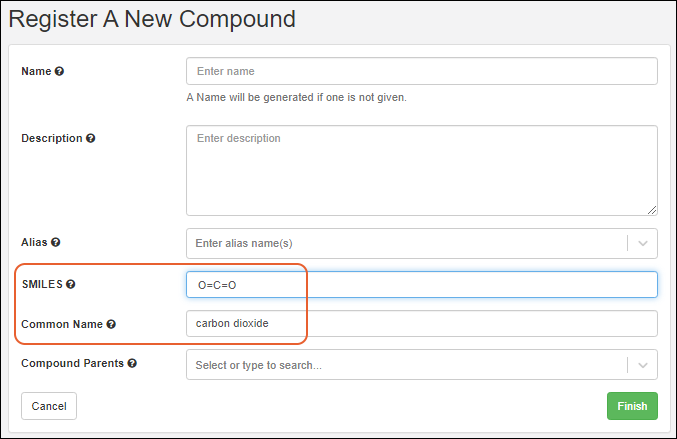
The SMILES string will be used to populate the
Structure2D, Molecular Formula, Average Mass, and Monoisotopic Mass columns.
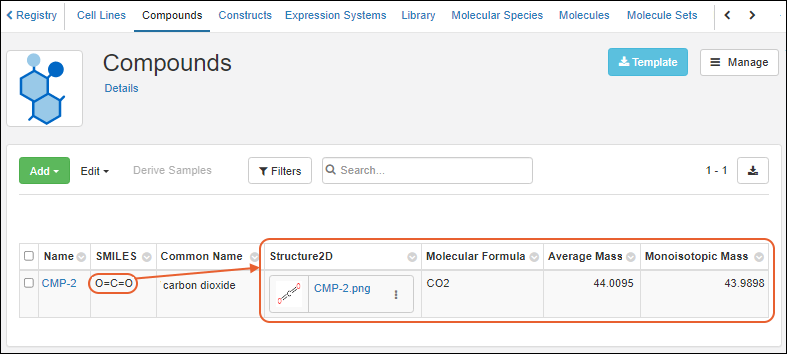
Click the thumbnail for a larger version of the
Structure2D image. You can download the image from the three-dot menu.
Import File of SMILES Strings
When a file of SMILES strings is Created/imported, each is used to query for the respective 2D structure, molecular weight and set of computed properties. During the Create/Import operation if Name/ID isn't specified, the SMILES string is used for Name.
Create a Molecule from a Compound
You can register a new molecule directly from a compound's detail page. Click
Create Molecule to open the molecule registration form with the compound pre-selected as a component. This is useful when a compound is the starting point for a new molecular entity such as an antibody drug conjugate.
Related Topics

