LabKey Biologics LIMS offers a number of different ways to work with assay data in the system beyond that offered by the Sample Manager and LabKey LIMS products.
Assay Batch Fields
Click the name of an Assay Design to see it's summary page, with several tabs, showing various scopes of the data. In addition to
Runs and
Results, assays in Biologics LIMS may also have fields (and a tab) for
Batches of runs.

Assay Quality Control
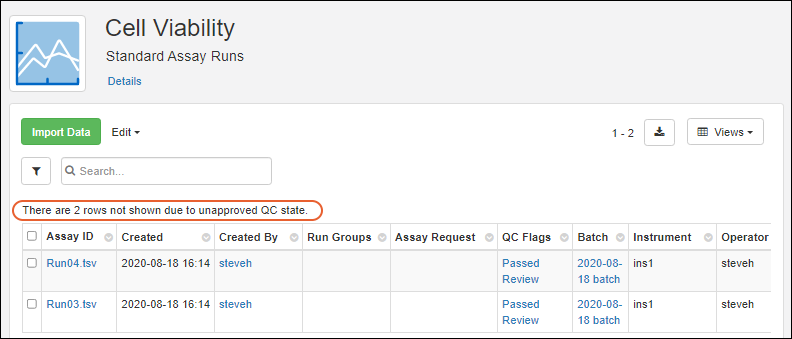
Visibility of assay data in Biologics can be controlled by setting quality control states. While an admin can edit assay designs to use QC states within the Biologics application, the actual states themselves cannot be configured in the application.
Set Up QC States (Administrator)
To configure states, an admin must:
Use QC States (Users)
Once QC states have been configured in the system, users (with the appropriate roles) can assign those states to assay run data. Users can update QC states in the following cases:
- When a user has both Reader and QC Analyst roles
- When a user has either Folder-, Project-, or Site Administrator roles
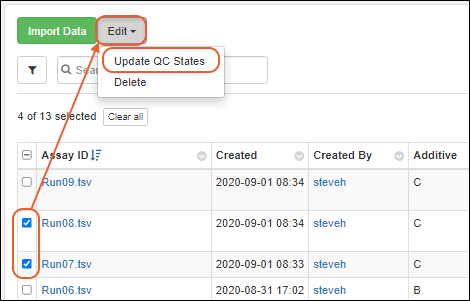
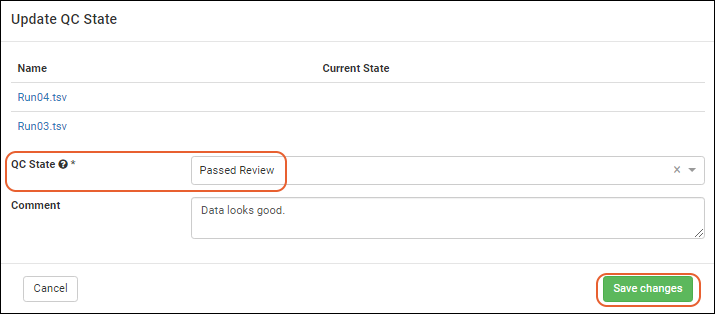
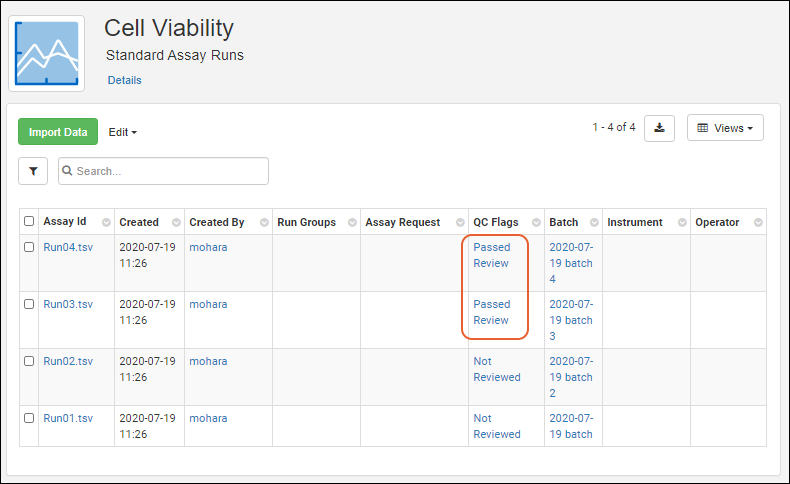
To assign QC states within the Biologics application:
Related Topics