Assay data is captured using
Assay Designs. Each Assay Design includes fields for capturing experimental results and metadata about them. Once a design has been created, many runs of data matching that format can be imported with the same design.
Learn more in the Sample Manager documentation here:
While the
Standard assay described in the above documentation is sufficient for most use cases, in Biologics LIMS, administrators can also use
pre-configured Specialty Assays when needed. This topic describes the initial selection step for doing so.
Create a New Assay Design
To create a new assay design in Biologics LIMS, follow this process. Make sure to start from the container where you want to define the assay.
- From the main menu, click Assays, then click Create Assay Design.
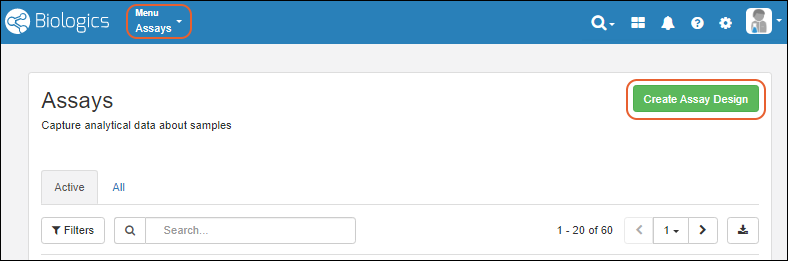
Select the Assay Type
- Select the Assay Type. For most cases, leave the Standard Assay tab selected.
- Click Choose Standard Assay.
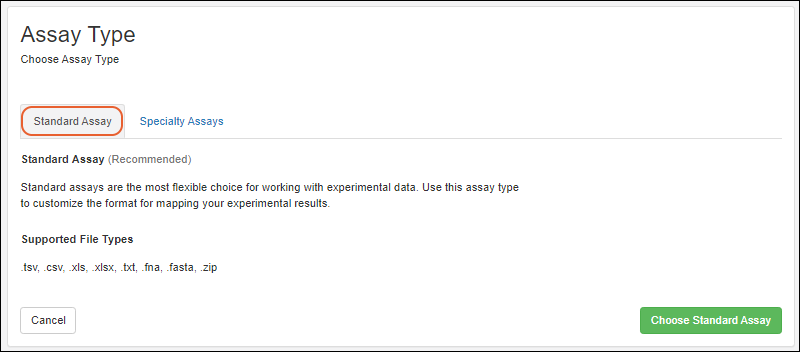
- Creating a standard assay in Biologics is the same as described in the Sample Manager documentation here:
- Creating specialty assays follows a similar process. Specific properties of the specialty assays can be found in this section:
Related Topics

