This topic shows you how to set up a python script to download a file from LabKey Server. If you are not already familiar with using the Python API with LabKey Server, get started with the topic:
Python API Demo
Note: This example uses version 2 of the LabKey Python Client API.
Set Up
This topic expects that you can run python scripts against LabKey already. Some key prerequisites are:
- LabKey Development Machine: This topic assumes that you have a development machine running as http://localhost:8080/labkey.
- Python: You should have a supported version of python installed, available on your path, have installed the labkey package, and confirmed you are running version 2. Learn more in this section: Set Up Python
- Authentication: In this example, we assume you are using a netrc file to provide credentials for accessing your server. Learn more in this section: Authentication
Create Target Environment
To use our example script as is, you need a running localhost server and a specific project/folder structure, with a specific file loaded into the LabKey file browser there.
If you have completed the
File Repository Tutorial on your development machine, you will already have a matching environment. Skip to the
next section.
If not, complete these steps. You'll find more detail in
the File Repository Tutorial itself.
- On your server, create a project named "Tutorials" if you don't already have one. Accept all defaults.
- In that project, create a subfolder named "File Repository" and again, accept defaults.
- In > Page Admin Mode, add a Files web part.
- Click here to download LabKeyDemoFiles.zip. Unzip it, then drag and drop the unzipped LabKeyDemoFiles directory into the Files web part.
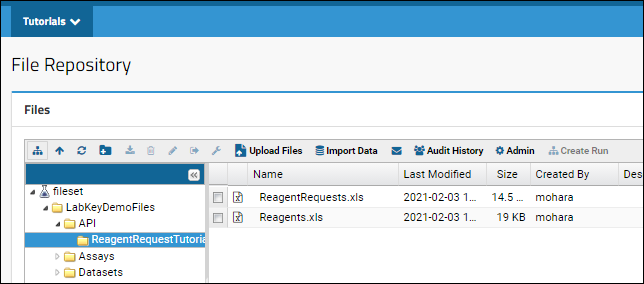
- Expand the LabKeyDemoFiles to see that there is a file /API/ReagentRequestTutorial/Reagents.xls within it. This is what the example script will download to your local machine.
Obtain and Run Example Script
Download this example script and place it where you will want to run it. Note that by default it will also download the file to that same location on your local machine.
Run the script:
If your server and file repository match our example, you will now see a new "Reagents.xls" file in the script directory.
Customize the Download Script
Note that Python is very picky about tabs. When you edit this example, or any script, use caution with text editors to ensure they don't convert tabs to spaces.
Notes within the script itself can help you customize things like:
- labkey_server and context_path: The base server URL.
- container_path: The project and folder path on your server.
- sourceFilepath: The path within the file repository specifying the desired file.
- destinationFilepath: The location to which to download the file. Several examples are given.
download_file.py Script
from future import unicode_literals
from labkey.api_wrapper import APIWrapper

# -------  Example code to download a file from the server -------

# Define the API wrapper that will access the desired container on your server.
# Learn more in the documentation topic here: https://www.labkey.org/Documentation/wiki-page.view?name=pythonDemo#apiWrapper
labkey_server = 'localhost:8080'
container_path = 'Tutorials/File Repository'
context_path = 'labkey'
use_ssl=False
api = APIWrapper(labkey_server, container_path, context_path, use_ssl)

# Helper to build the webdav URL
# :param filePath: The relative file path within the file browser
# :return: the URL to GET the request from
def build_webdav_download_url(filePath):
    sep = '/'
    url = 'http://' + labkey_server

    if context_path is not None:
        url += sep + context_path
    url += sep + '_webdav'

    if container_path is not None:
        url += sep + container_path
    else:
        raise ValueError("container path in server context must be set")

    url += sep + '%40files' + sep + filePath + "?contentDisposition=attachment"
    return url


# Definition of download_file: Download a file from LabKey server
# :param sourceFilepath: The filepath and file name with file extension of the file you
#     want to download from the server (details below)
# :param destinationFilepath: The local filepath to download to (details/examples below)
def download_file(sourceFilepath, destinationFilepath):
    url = build_webdav_download_url(sourceFilepath)

    fileBytes = api.server_context.make_request(url, None, method="GET")['content']
    fileName = sourceFilepath.split('/')[-1]

    f = open(destinationFilepath + fileName, 'wb')
    f.write(fileBytes)
    f.close()


# Source file path is relative to the file root of the 'container_path' set above
#  i.e. this will be everything after @files in the path you can see on your server.
sourceFilepath = "LabKeyDemoFiles/API/ReagentRequestTutorial/Reagents.xls"

# Destination file path (on your local machine) can be relative to where you run the
# script, or absolute. A few examples are below.
destinationFilepath0 = ""                             # File downloaded to current directory
destinationFilepath1 = "localFolder/"                 # File downloaded to 'localFolder' within current directory
destinationFilepath2 = "/Users/username/Downloads/"   # File downloaded to (my) downloads folder

# Download the file
download_file(sourceFilepath, destinationFilepath0)
Related Topics

